
Inspection UI
The inspection UI (@agent-dev-lab/web) is how you start, watch, and replay runs for an ADL project. It does not execute workflows itself: it calls loadAdlProject(), then workflow.run / agent.run, and tails persisted RunEvents.
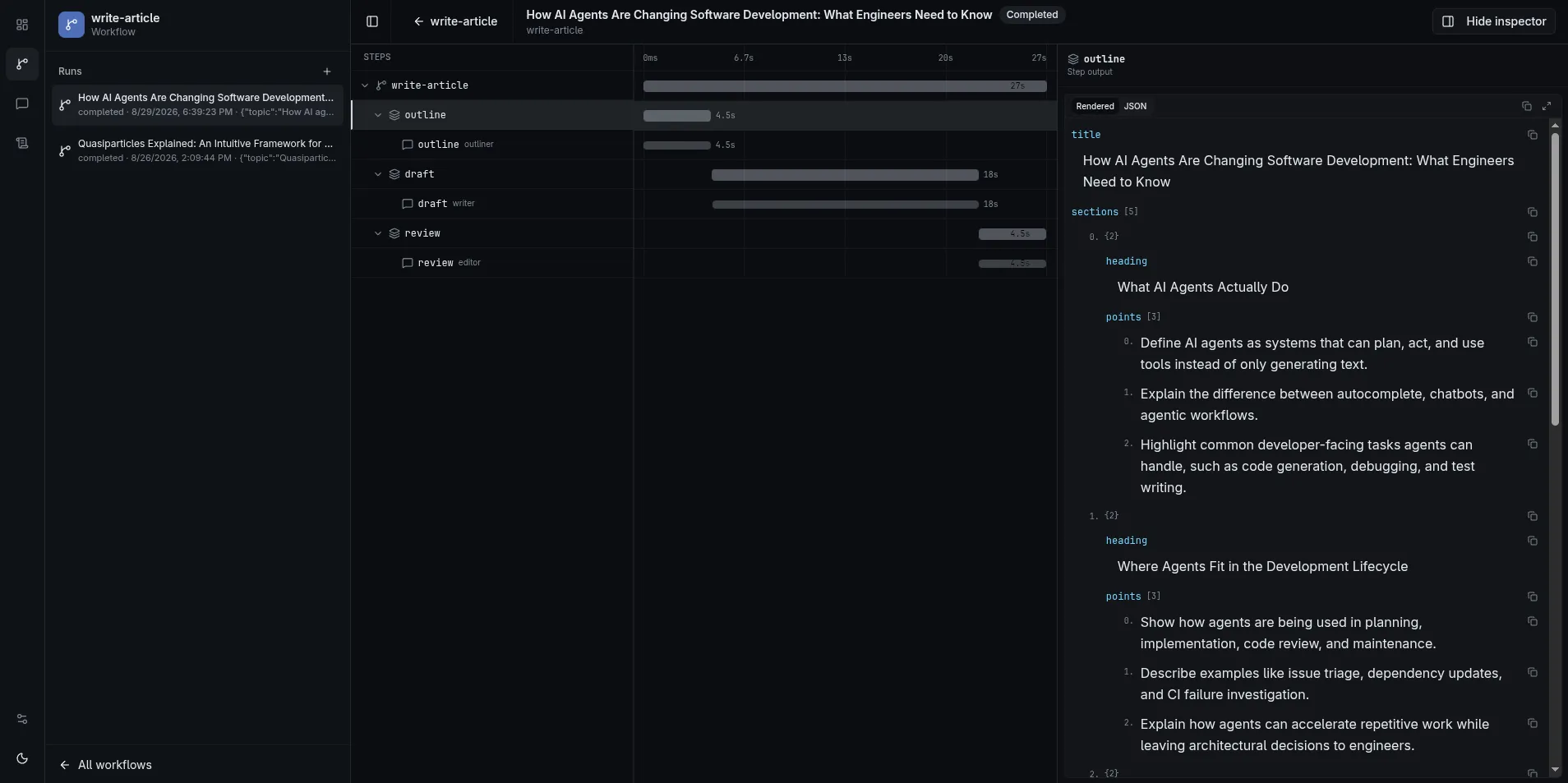
Open the Inspector
Section titled “Open the Inspector”From a project with adl.config.*:
bunx adl dashboardbunx adl dashboard --servebunx adl dashboard --project ../other-researchThe header shows the project name. Editing agents, workflows, or templates updates the catalog as soon as the dashboard process is running (a browser tab is not required). The process prints [adl] watching <project> once the watcher is armed, then a Vite-shaped [adl] reload <file> (or [adl] reload failed) on each change. --serve / -s turns watching off (ADL_PROJECT_WATCH=0); restart after those edits. Changing .env* always needs a restart. --project / -p points at another directory that contains adl.config.*. --prebuilt / -b forces the shipped Nitro UI instead of Vite — published @agent-dev-lab/web already has no Vite tree, so a normal install serves Nitro without the flag. Port is --port / -P (-p is already --project); if that port is taken, the next free port is used. --strictPort fails instead of hopping.
Standalone CLI commands (adl workflow run, adl agent run, adl workflow list, etc.) are separate processes: they load the project once and exit.
Workflows
Section titled “Workflows”Registered ids come from adl.config workflows. The sidebar lists startable workflows and past runs (title from ctx.setTitle when set).
- Open a workflow and start a run. If the workflow has a Zod
inputSchema, the start dialog and the workflow page (when no run is selected) edit the whole input as a document, including raw JSON. Defaults apply. Schema and JSON parse errors appear on submit, not while typing. The form does not collect tags. - The run page is a waterfall: steps, nested workflow runs, parallel keyed steps, and agent episodes. A nested
workflow.run()sits under the calling step, or under the workflow row when the call is at the root. Expand a nest to load its steps. The sidebar defaults to root runs; Non-Root lists nested runs, and a child run page links back to its parent. - Select a step or agent call for output, errors, and the conversation transcript for that
memoryScope. Tags fromworkflow.run(input, { tags })/agent.run({ tags }), plus the automaticversion:orcommit:tag, appear in a footer on the inspector. There is no run-list tag filter. - Retry (run header or the workflow-row menu) and Retry from here (step menu or step inspector) seed a new attempt. The prior run stays in the list. Retry is unavailable while any run in that attempt forest is still running. Copied steps link back to the original and keep the prior attempt’s duration on the waterfall.
- Cancel calls
handle.cancel(), which abortsctx.signal, in-flightctx.stepbodies, nested workflow runs, and childagent.run/streamTextcalls on that run. Cancelling a nested run id aborts the active root. Isolated helper runs (for example conversationtitleWorkflow) are not cancelled with the parent. - A run waiting on
ctx.requestApprovalor a gated tool call shows as suspended with Allow / Deny. Deny fails the waiting step with an “Approval denied” error. - Pause on a running run stops it at the next step entry or gated tool call. While it is paused at a breakpoint, Continue resumes and Step resumes until the next step entry. Continue and Step only resolve debugger pauses; an approval still needs Allow or Deny.
- Runs still running or suspended when their process stops cannot continue. On start, the inspector marks them failed with a “Process restarted” reason instead of leaving them live. Runs started by another process that is still alive on this machine, or by any process on another host, are left alone.
Live updates use SSE (GET /api/runs/:runId/events?afterSeq=). Reconnects replay from the last applied runSeq. History is always the SQLite (or in-memory) WorkflowStore, so you can reopen a finished run later.
Helpers that you do not put in workflows: [] still persist if they run(), but they do not appear as startable targets or in the default run list. Conversation titleWorkflow uses { isolated: true } so naming a chat does not inject steps into another workflow’s tree.
Agents
Section titled “Agents”Registered agents can be opened as conversations (standalone memoryScopes), not only as nodes inside a workflow.
- New chat →
agent.run()(AI SDKstopWhen, defaultstepCountIs(20)); first successful turn may set a title viatitleWorkflow. Tool call/result events still fire while the model works. - Conversation and workflow-run sidebars show provider-reported token totals rolled up from finished episodes (
streamText.totalUsageonagent_finished). Workflow-run totals include nested child runs in the sameparentWorkflowRunIdforest. Counts may omit cache/reasoning fields when the provider does not report them; there is no dollar estimate yet. The conversation settings panel and workflow step inspector also show usage for the open conversation / selected agent call. - Fork from a workflow agent episode copies that transcript into a new conversation you can continue.
- Shared scopes show history up to the selected episode; later turns are muted so you can see what the model had at that call.
- The agent settings panel reports effective model (id + provider when the LanguageModel exposes them), memory backend kind (
sqlite/in-memory/ custom), tools,stopWhen(default/custom), and title workflow id. Whenadl.configdefines a host-onlymodels[]catalog, the panel also offers a Next turn picker: the selected entry’sfactory()becomesAgentRunInput.modelfor the next send (not a conversation pin). OptionalapiKeyEnvon a catalog entry flags a missing key before send. Whentoolsis aToolProvider, the panel also shows a Tool context form built fromcontextSchema(or a JSON field if that schema is missing / not an object). Each standalone message sends that value astoolProviderContext. There is no cwd default. The draft is seeded from the latest local episode, else the fork source episode, else an inspector-only agent default (editable on the agent definition page). Unsaved draft edits do not survive a full reload. Selecting?call=(or View tool context from the chat / event-log context menu) shows that episode’s immutable snapshot; Copy to next turn fills the draft on standalone and forked chats. Workflow-linked conversations stay read-only but display the episode snapshot; the editable form is for standalone and forked chats.
Event Log
Section titled “Event Log”The Event Log page (/events) is a process-wide tail of every RunEvent the inspector has seen — workflow runs and standalone agent conversations — not one run at a time.
- Open it from the home sidebar or the rail. The context sidebar is hidden so the table can use the full width.
- Live updates use SSE (
GET /api/events?afterSeq=). The stream id is the processlogSeq, not per-runrunSeq. Reconnects replay from the last appliedlogSeq. - On inspector start, an empty in-memory buffer is hydrated from the last 100 persisted workflow runs and standalone agent episodes in
WorkflowStore. Clear empties the in-memory view only; persisted runs stay. Restart hydrates again. - Default filters hide
agent_text_delta. Add field clauses (equals / not-equals / contains on strings / exists / empty). Click a name to open that run, conversation, call, or step — conversations highlight the matching transcript slice (?call=). Right-click a value to filter; ⋯ opens the full JSON payload. - The footer paginates the filtered list (oldest page first; page 1 is the live tail when you stay on it).
The log is a ring buffer (default 10_000 events). It is not a durable store of its own — durability is still WorkflowStore.
What Is Not in the Inspector Yet
Section titled “What Is Not in the Inspector Yet”- A template playground (edit/render
createTemplatemarkdown in the UI) - A dedicated raw token-debug pane (assistant text already streams via
agent_text_deltain chat/run views) - Manual runs of
adl.config.tools(registry-only today; runtime merge iscreateAdlRuntime({ tools })) - A start-run tag picker or a run-list tag filter (tags are a TypeScript
runoption; the inspector only displays them)